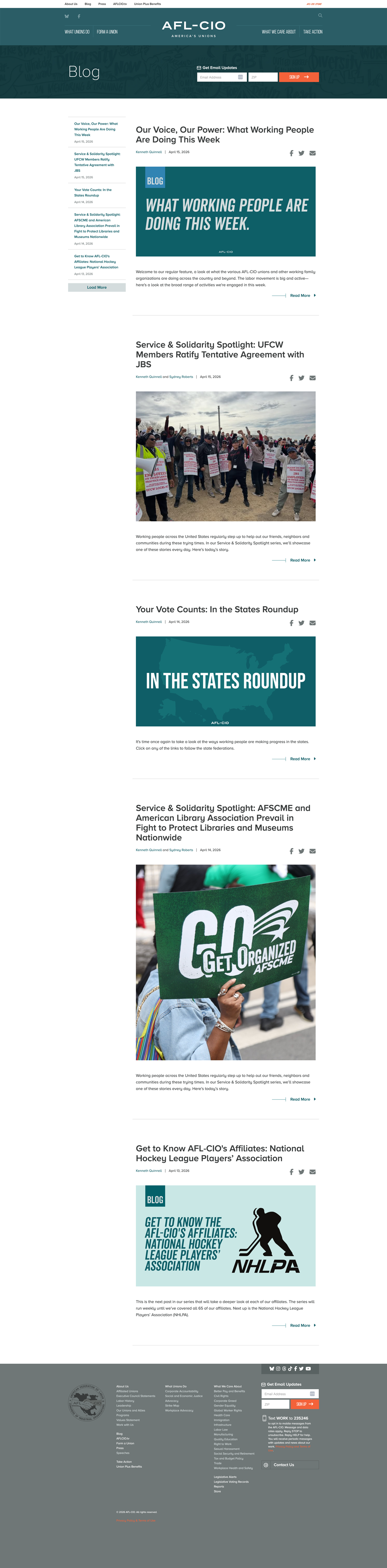
Remaining landings and tools. Homepage is Batch 4.
Issues landing (What We Care About) Route Based Design this
Example: https://aflcio.org/issues. Short intro plus three issue listings. Individual issue pages (e.g. Civil Rights) are a separate template — see Issue page below.
| Field | Type | Required | Notes |
|---|---|---|---|
| Hero Issue | Entity Reference | Required | One featured issue: large image, icon, title. Same term fields as an issue page hero, used as a landing banner. |
| Featured Issues | Entity Reference | Not Required | Tile grid of selected issues (image + name). Tile treatment should match homepage featured issues if those exist. |
| Other Issues | Entity Reference | Not Required | Name + icon list of remaining issues; currently a simple row of links. |
| Intro copy | Text Long | Not Required | Landing headline/body. |
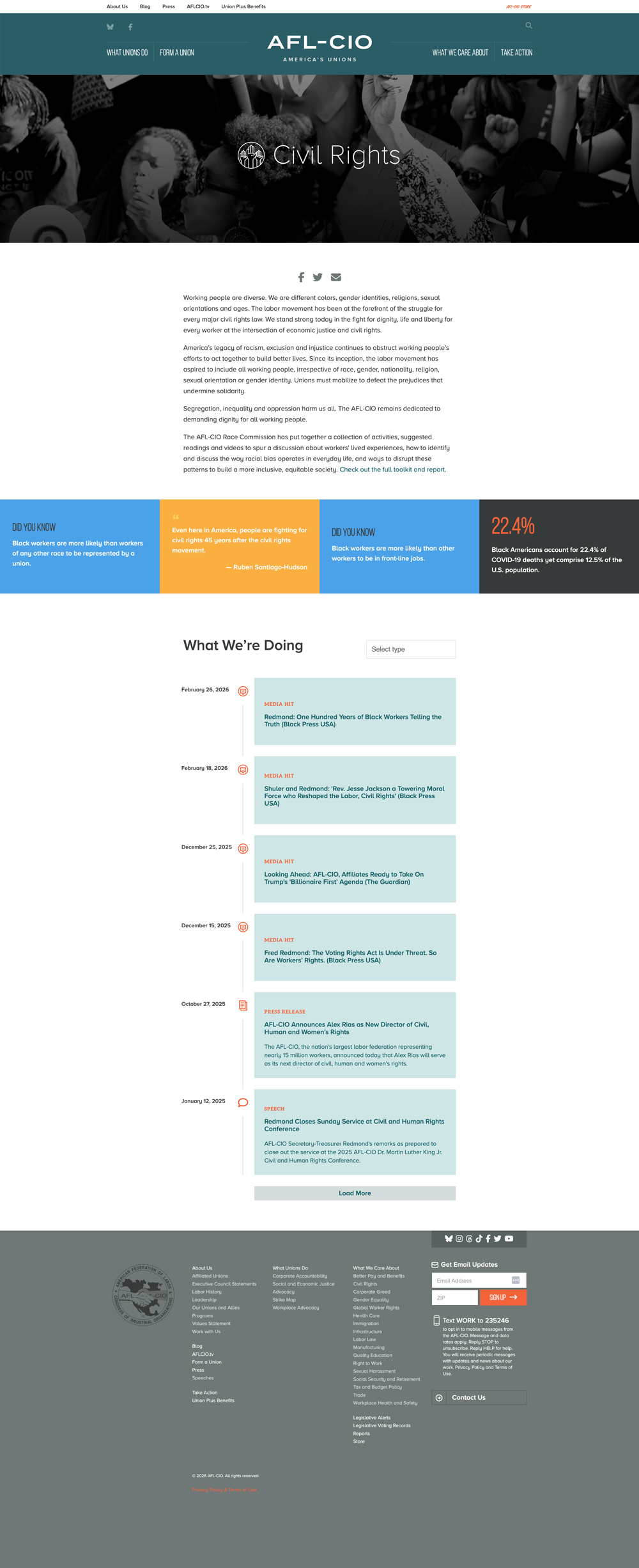
Issue Page (Taxonomy Term) Route Based Design complete
Full issue taxonomy landing page that assembles hero + issue blocks and timeline/listing content for a specific issue.
| Field | Type | Required | Notes |
|---|---|---|---|
| Issue Image | Entity Reference (Media Image) | Required | Used in issue banner and tile displays (teaser variant is current). |
| Summary | String Long | Not Required | Brief summary used on What We Care About style landing contexts. |
| Issue Icon | List String | Not Required | Optional icon treatment for issue cards/headers. |
| Related Action | Entity Reference (Action node) | Not Required | Featured action CTA on issue page. |
| Issue Footer | Text Long | Not Required | Bottom-of-page issue footer copy. |
| Card Stacks | Entity Reference (Cards node) | Not Required | Select and arrange card stacks on this issue page. |
| Paragraphs | Entity Reference Revisions | Not Required | Supports text, media, pull quote, section, tiles, factoids blocks. |
View Modes:
| Variant | Examples |
|---|---|
| default | Example issue taxonomy page — full issue route (Hero Issue, Featured Issues, Other Issues, Latest Report, timeline/stream of referenced nodes). |
| hero | Issues landing — Hero Issue block (What We Care About). |
| tile | Homepage and issues landing — Featured Issues tiles. |
Paywatch Design this
Example: https://aflcio.org/paywatch.

In-page nav Design this
Section jump list at the top of the annual report and its subpages. Item labels are content (change yearly); the nav itself is the component. Desktop + mobile, including how it behaves while scrolling.
Hero Design this
Full-bleed cover and title band under the nav. Art, headline, and lead copy change yearly; the layout is what to design. Search sits under it. Desktop + mobile.
Company search Design this
Example: https://aflcio.org/paywatch. Autocomplete by company name or ticker. Needs empty, results, and no-results states. Desktop + mobile. Choosing a result opens the company modal.
Company modal Design this
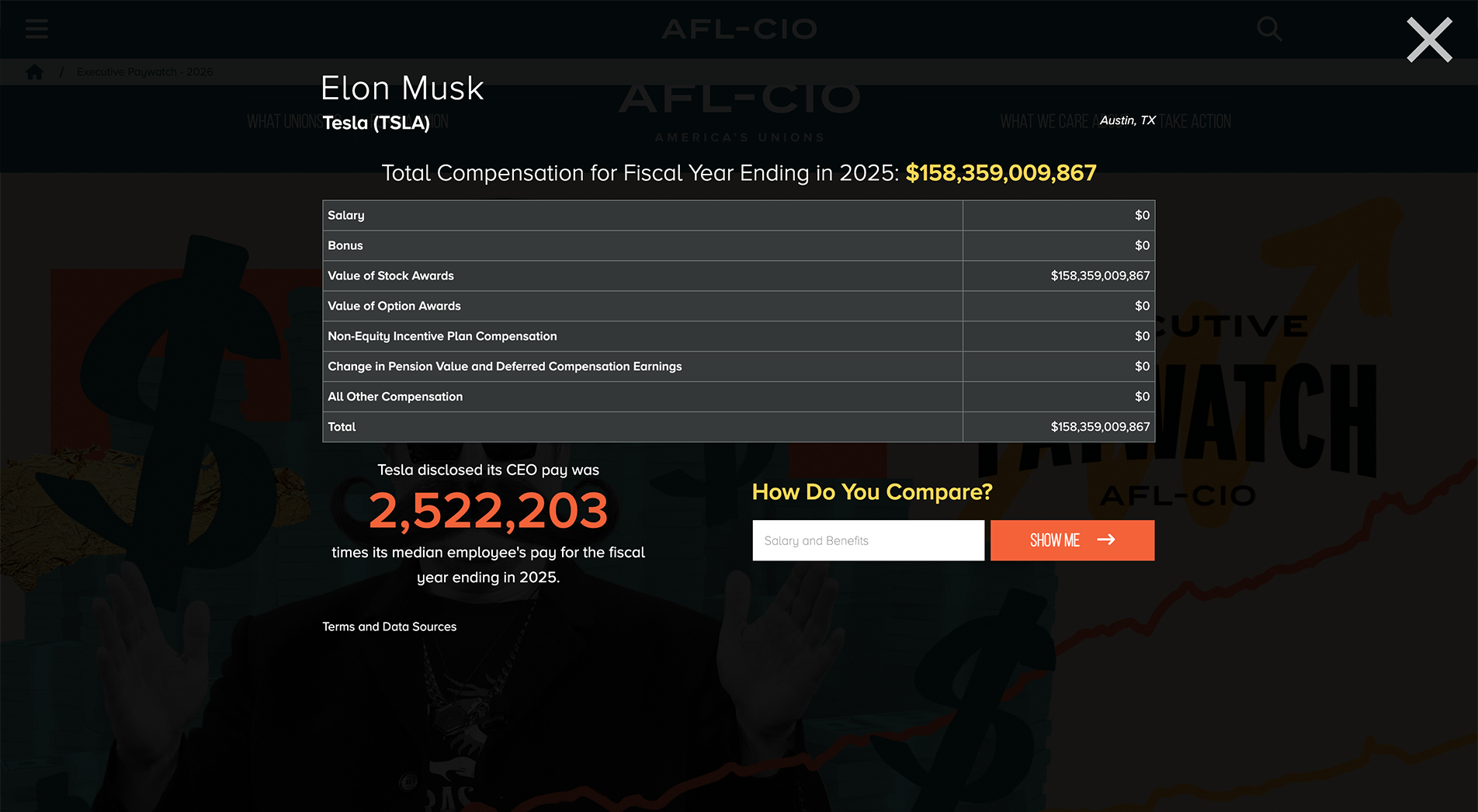
Opens from search and from the Highest Paid CEO table (ticker or company name). Same content as https://aflcio.org/paywatch/AAPL — screenshot the modal, not the full page.
| Field | Type | Required | Notes |
|---|---|---|---|
| Company + ticker | String | Required | Header. |
| Location | String | Not Required | City, state. |
| Year + total compensation | Integer | Required | |
| Pay breakdown | Integer | Required | Salary, bonus, stock, options, non-equity, pension, other, total. |
| Pay ratio | Integer | Not Required | CEO vs median employee (or vs U.S. median if undisclosed). |
| Compare | Not Required | Enter your pay → “How Do You Compare?” result. Second state after submit. |
Desktop + mobile. Closed, open, and compare-result states.
Stat / figure grid Design this
Repeating KPI band used every year (paywatch-figures / paywatch-figure-number +
label). Typically 2–8 figures. Numbers and captions are content. Need a compact and a large variant, and a
wrapping rule for small screens.
Charts Design this
Stable chart types, not this year’s story. Live 2026 page uses amCharts targets:
| Field | Type | Required | Notes |
|---|---|---|---|
| CEO pay chart | Line / area | Not Required | CEO pay over time |
| Labor share chart | Line / area | Not Required | Workers’ share / related series |
| Comparison chart | Bar / serial | Not Required | Comparison bars (e.g. political spending) |
Design considerations: Axis, legend, tooltip, and mobile stacked/scroll behavior. Do not design a unique chart for each year’s anecdote.
Data tables Design this
Two repeating tables on the annual report page: pay-type breakdown (salary, bonus, stock…) and CEO pay by industry (compensation, median worker, ratio). Need header, numeric alignment, mobile (card vs horizontal scroll), and optional sort.
Highest Paid CEO table Design this
Example: https://aflcio.org/paywatch/highest-paid-ceos. Sortable listing of companies. Ticker and company name open the company modal.
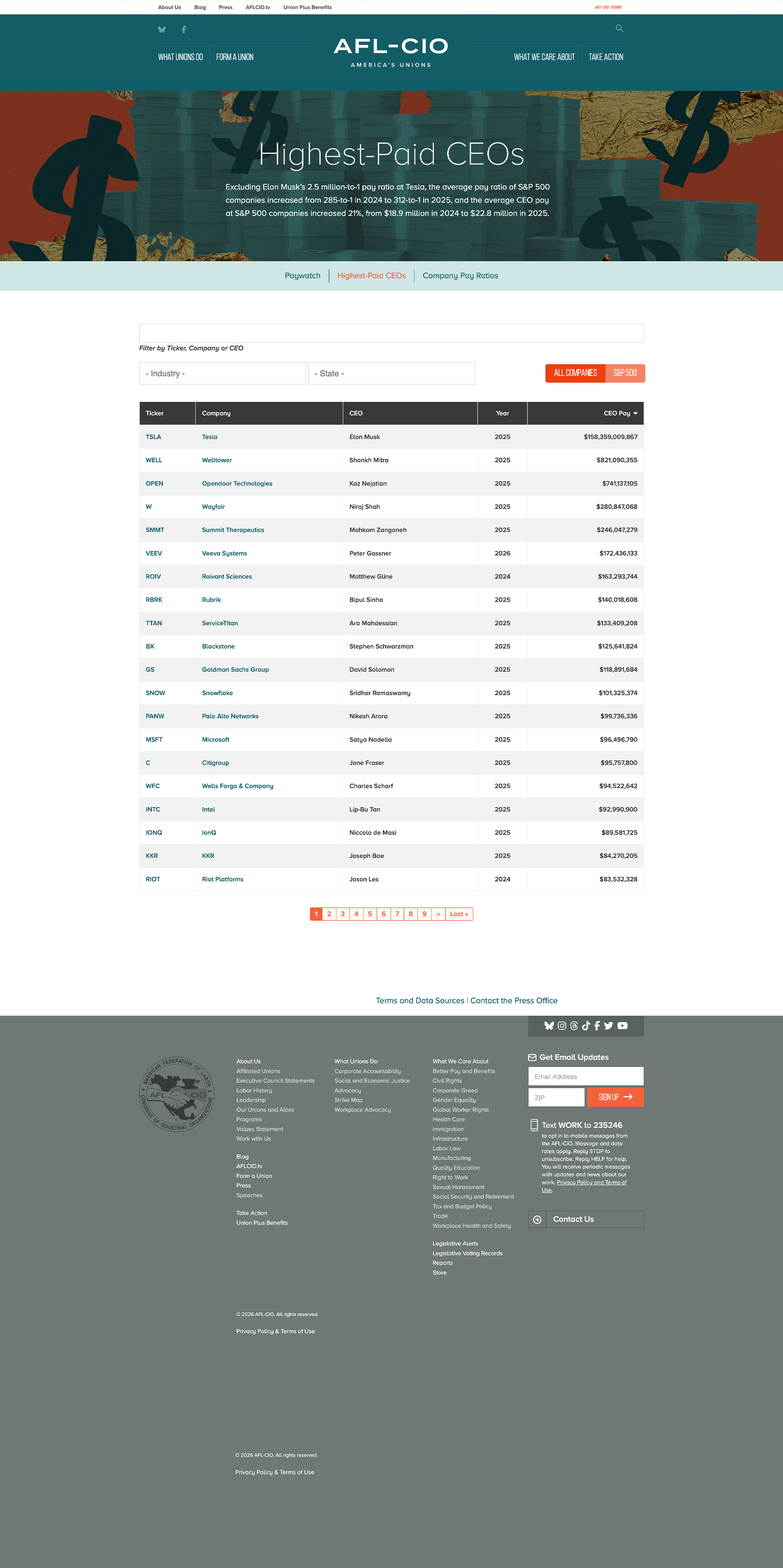
Columns: ticker, company, CEO, year, CEO pay. Filters: keyword, industry, state, S&P 500 / Russell 3000. Pagination. Desktop + mobile.
State map Design this
US choropleth (chartdiv + map-overlay) with S&P 500 / Russell 3000 toggle.
Selected-state panel shows average CEO pay, worker pay, ratios, and a link to companies in that state.
Design map colors, toggle, hover/selected panel, and empty/no-data states.
Closing CTA Design this
“What can you do?” band + button. Recurs yearly; copy is content. Can reuse a generic marketing CTA if Batch 3 covers it.
Take Action Design complete
Example: https://aflcio.org/take-action. Action hero, Action teasers, and Get Updates — not a new template. Teasers also show on the homepage.
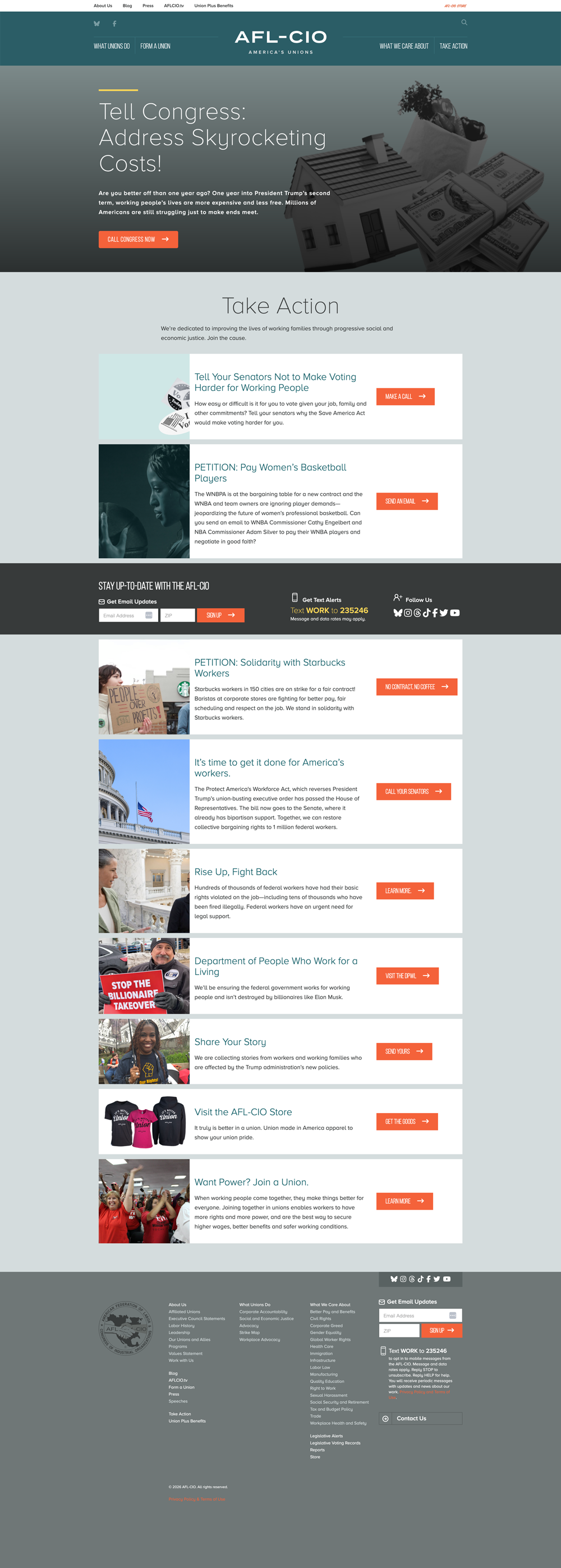
| Field | Type | Required | Notes |
|---|---|---|---|
| Featured | Boolean | Not Required | |
| Hero Alignment | List String | Required | |
| Issues | Entity Reference | Not Required | |
| Link | Link | Required | |
| Image | Entity Reference | Required | |
| Text | Text Long | Required |
View Modes:
| Variant | Examples |
|---|---|
| hero | Take Action — Take Action Hero block; align imagery and hierarchy with Featured/Top/Bottom. |
| teaser | Take Action teaser view block. |
Scorecard landing Design this
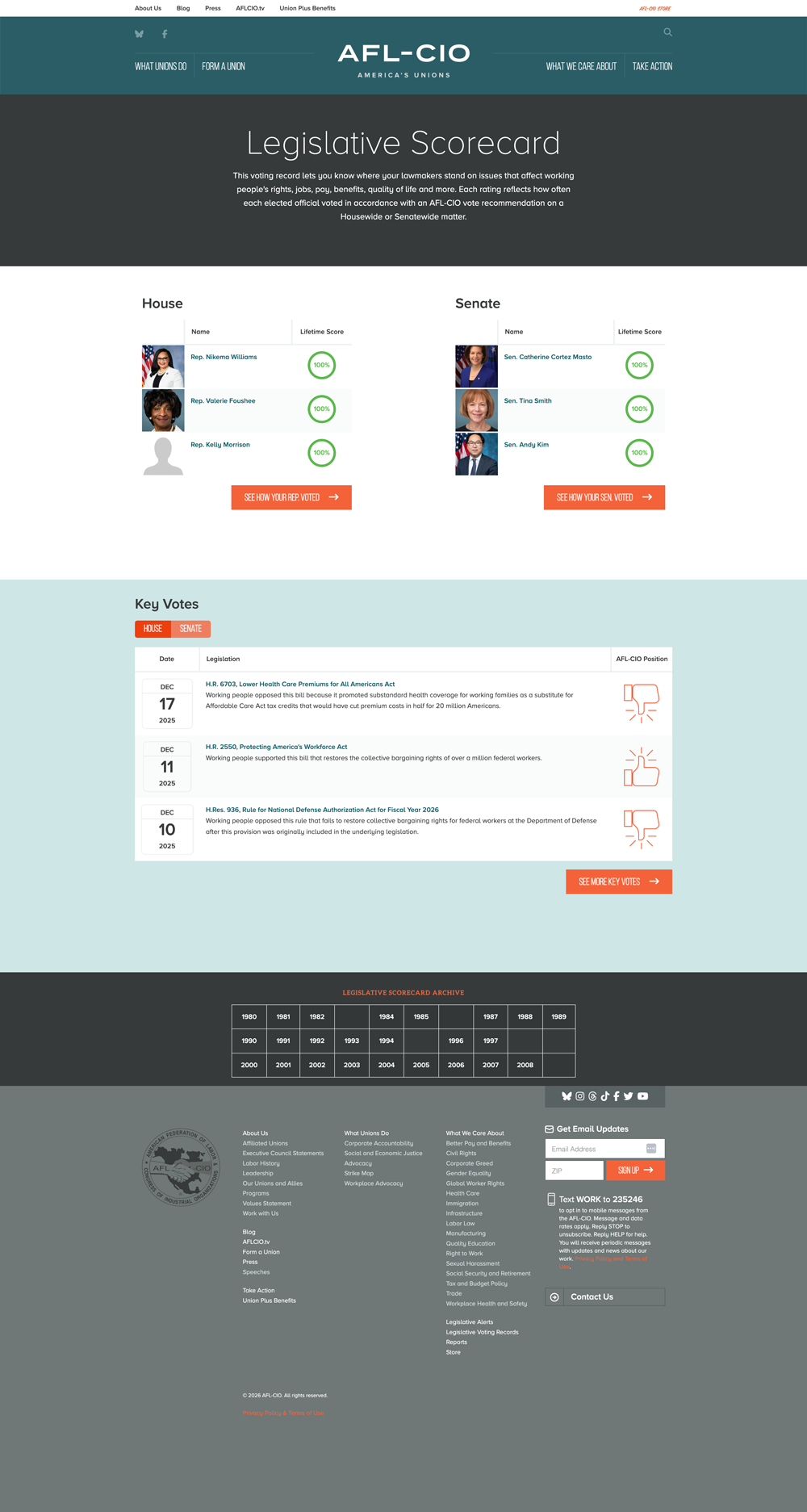
Example: https://aflcio.org/scorecard. Custom module afl_scorecard —
years/chambers/legislators/votes are data; the layout and controls around that data are what to design.
| Field | Type | Required | Notes |
|---|---|---|---|
| Intro | Text Long | Not Required | Title + short explanation. |
| Legislators widget | Entity Reference | Required | Two columns (House / Senate). Rows: photo, name, lifetime score as a circular gauge. CTA “See how your Rep/Sen voted” → full list. |
| Key votes widget | Entity Reference | Required | House/Senate toggle. Rows: date, bill title + blurb, AFL-CIO position (thumbs up/down). “See more key votes” CTA. |
| Archive | List String | Not Required | Grid/list of historical years. Repeating page pattern, not WYSIWYG. |
Legislators full list Design this
Example: https://aflcio.org/scorecard/legislators
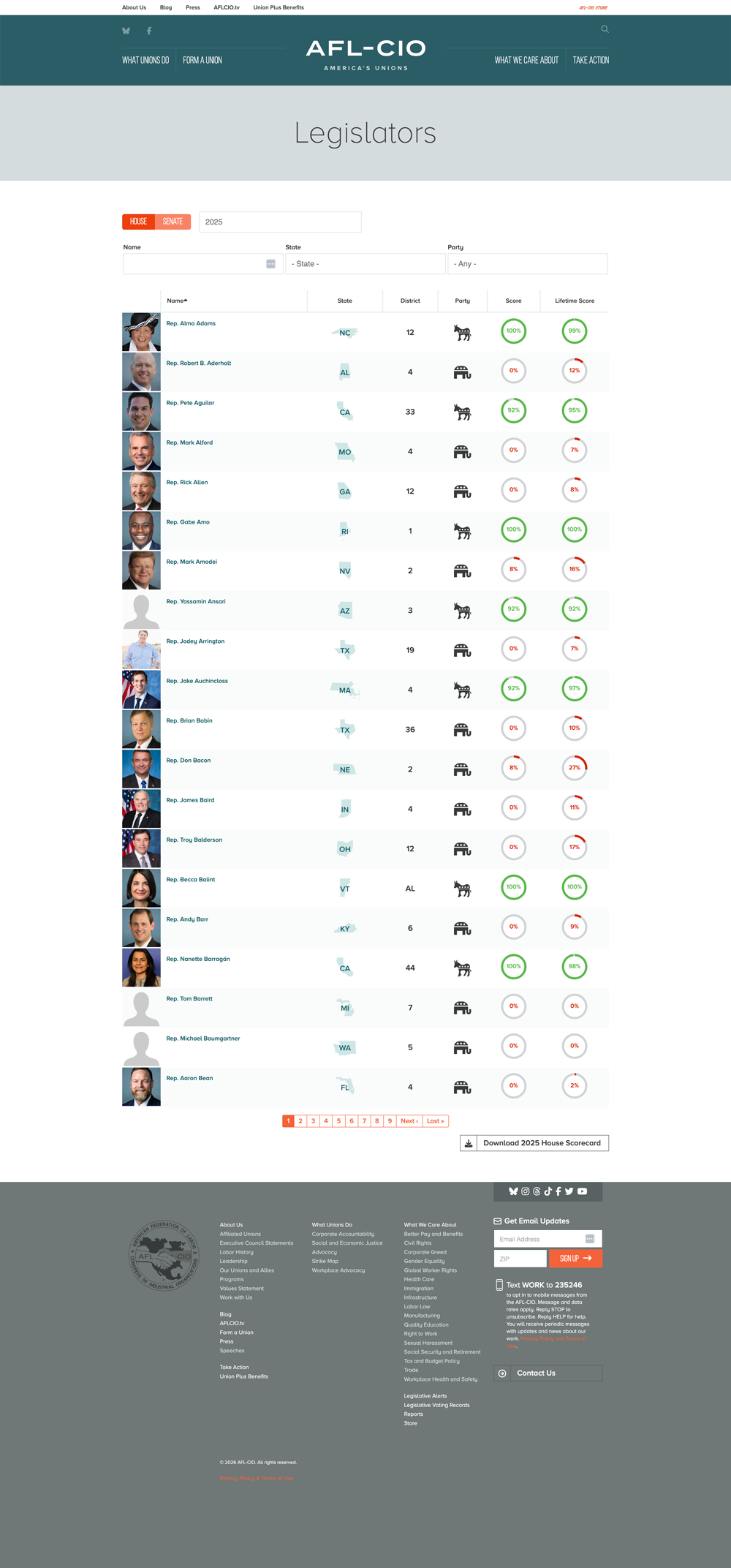
Filters: chamber tabs (House/Senate), year dropdown, name, state, party. Table columns: photo + name, state (icon + abbr), district, party icon, year score (circular gauge), lifetime score (gauge). Pagination + download button.
Design considerations: gauges, party/state icons, and filter row need a coherent desktop + mobile treatment (stacked filters, maybe card rows on small screens). Score color meaning (high vs low) must stay accessible.
Key vote + legislator detail Design this
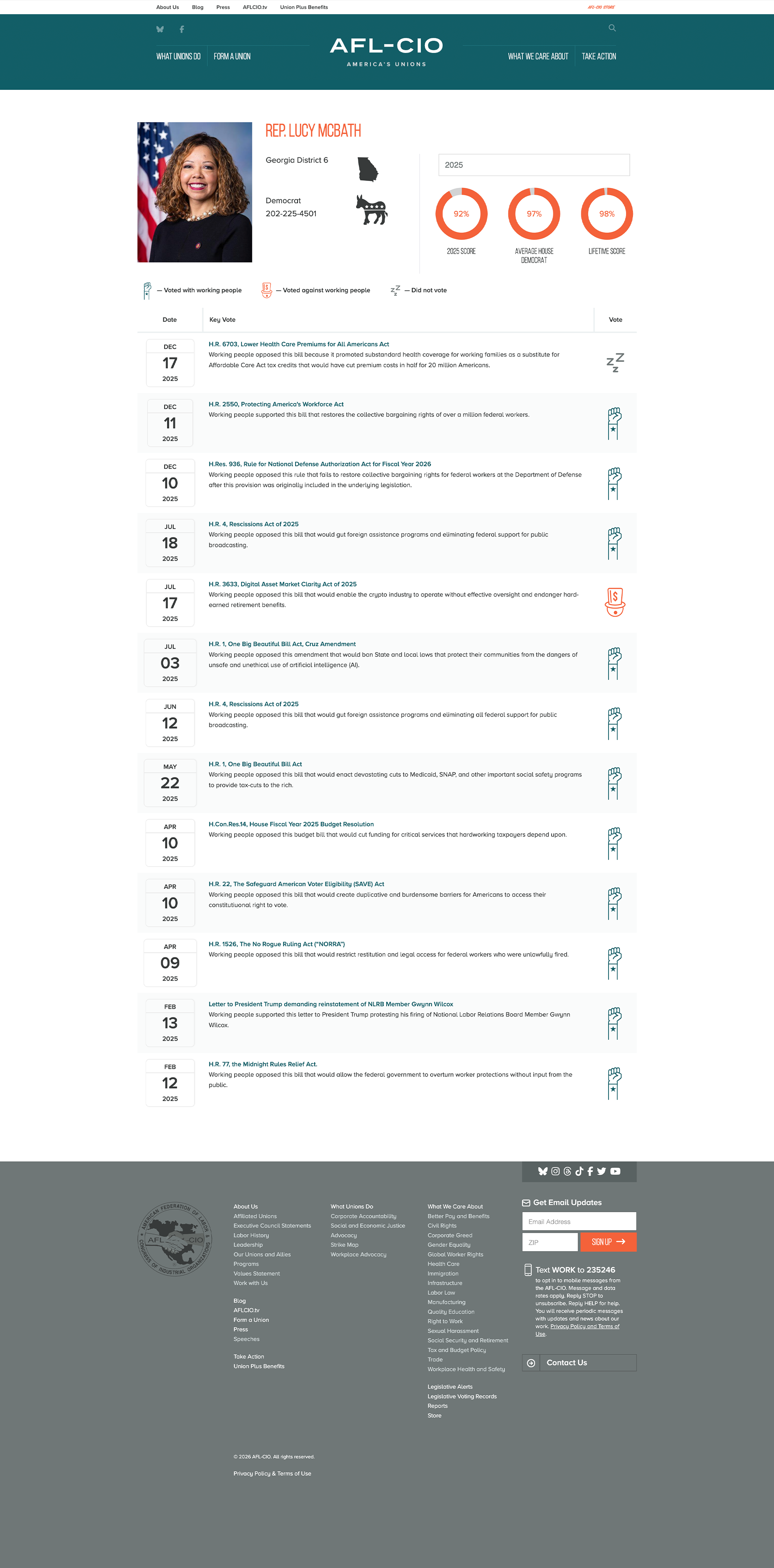
A single bill/vote (summary, AFL position, how each legislator voted) and a single legislator (photo, scores, vote history). Same look as the list. Legislator example — all three vote types (Yes / No / Not Voting): https://aflcio.org/scorecard/legislators/lucy-mcbath.
AFL-CIO TV Design this
Example: https://aflcio.org/afl-cio-tv. Today it’s a stack of video embeds (about 10), not a dedicated video listing.
Featured player + related-video grid. Reuse Batch 2 Multimedia / Media paragraph for the player. The landing needs a listing/featured layout that can take a livestream or a playlist of convention days.

| Field | Type | Required | Notes |
|---|---|---|---|
| Featured / livestream | Entity Reference | Required | Current page leads with convention days as headings over embeds. Design one featured player treatment (16:9, title, optional date/day label). |
| Video grid | Entity Reference | Not Required | Thumb + title; click opens the player or the multimedia page. Many items; needs pagination or “load more” if it stays a landing. |
| Page intro | Text Long | Not Required | Title/summary. |
Design considerations: Reuse the Multimedia player. Featured player + related-video grid is the landing.
About Us/Bio Hub Design this
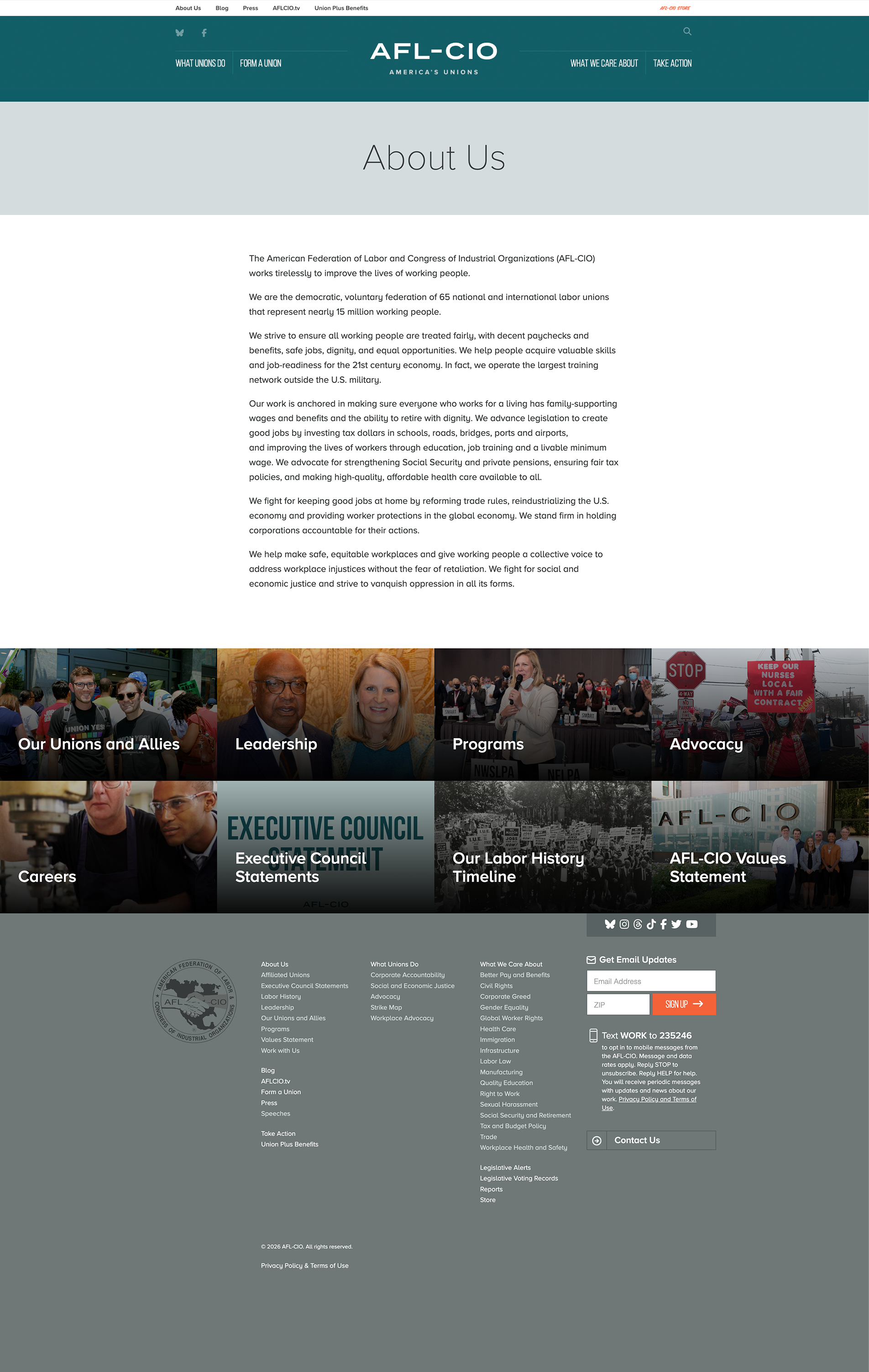
Example: https://aflcio.org/about-us. The hub today is intro copy plus a grid of child pages (Leadership, Programs, Advocacy, Careers, and the rest). I think the focus of this section should be on how we feature and list people — officers, and people in general. Officers Block and Officer / expert bio below are the listing and the page.
Officers Block Design this
Example: https://aflcio.org/about-us/leadership. Photo, name, title, short summary, link to bio. Live page features Liz Shuler and Fred Redmond as large cards.
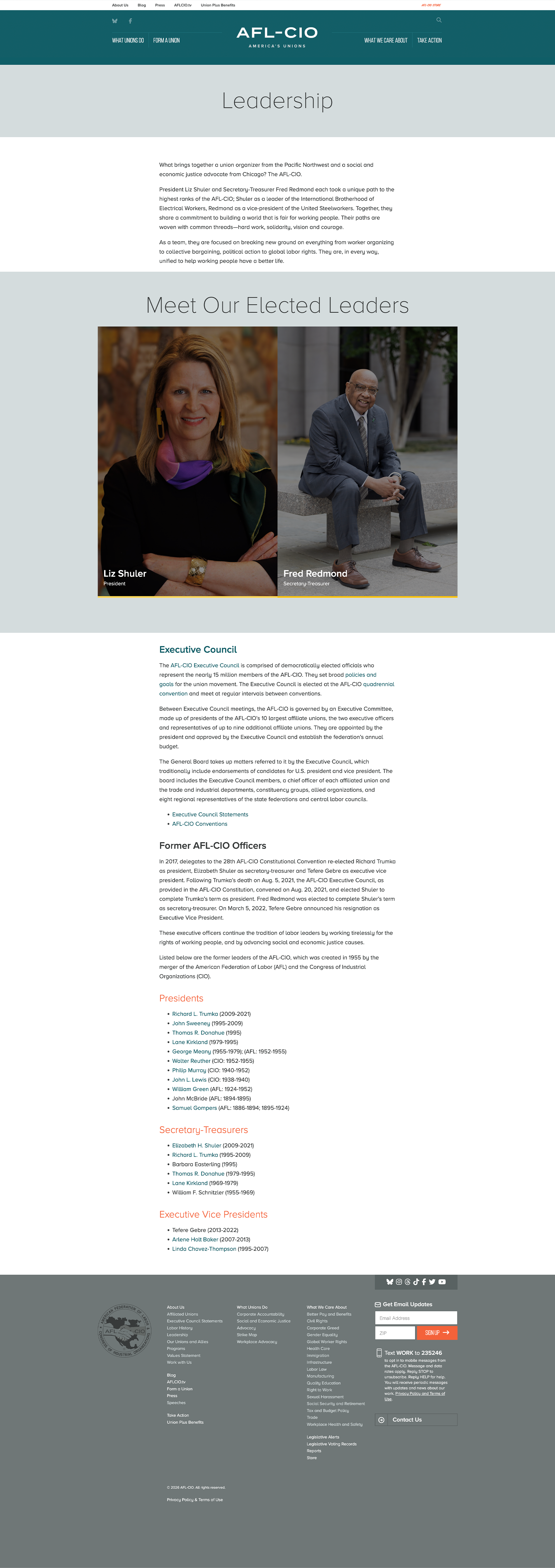
| Field | Type | Required | Notes |
|---|---|---|---|
| Photo | Entity Reference | Required | Square crop today. |
| Name | String | Required | |
| Title | String | Required | e.g. President |
| Summary | String Long | Not Required | Used on hover/card overlay. |
Design featured + grid variants.
Officer / expert bio Design this
Example: https://aflcio.org/about/leadership/liz-shuler. Same page for officers and policy experts. Photo, name, title, body, and a timeline of their work — it needs to work as a real people page.
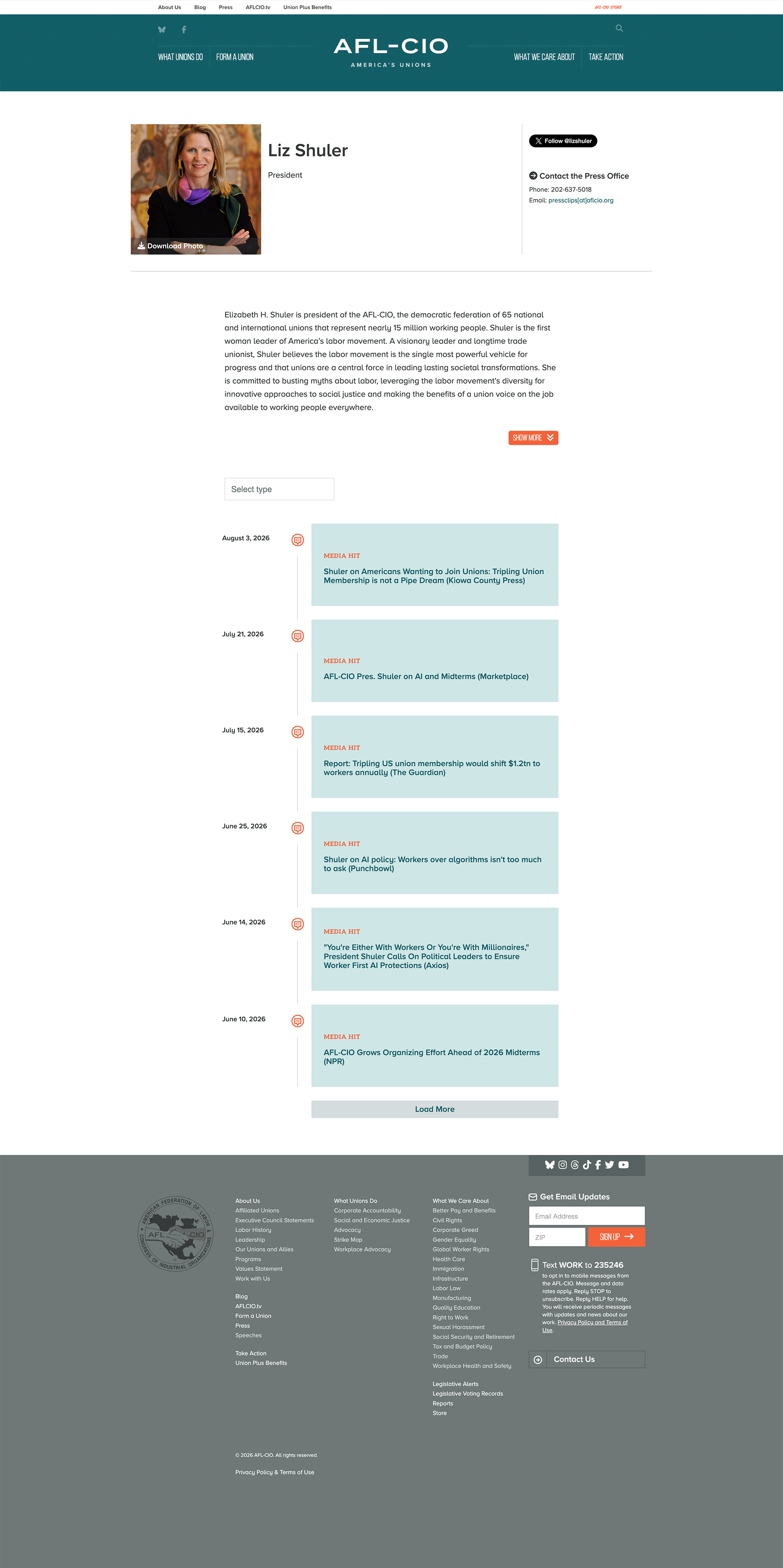
| Field | Type | Required | Notes |
|---|---|---|---|
| Photo | Entity Reference | Required | |
| Name | String | Required | |
| Title | String | Required | |
| Issues | Entity Reference | Not Required | Optional policy-focus issue links. |
| Contact / social | Link | Not Required | Press-office contact and social. |
| Biography | Entity Reference Revisions | Not Required | Long-form. |
| Timeline | Entity Reference | Not Required | Dated stream of related articles/media hits (same idea as issue “What we’re doing”). Align with the Issue timeline if possible. |
Blog Design complete
Example: https://aflcio.org/blog. Listing of Article teasers. Article fields and view modes are in Batch 2.